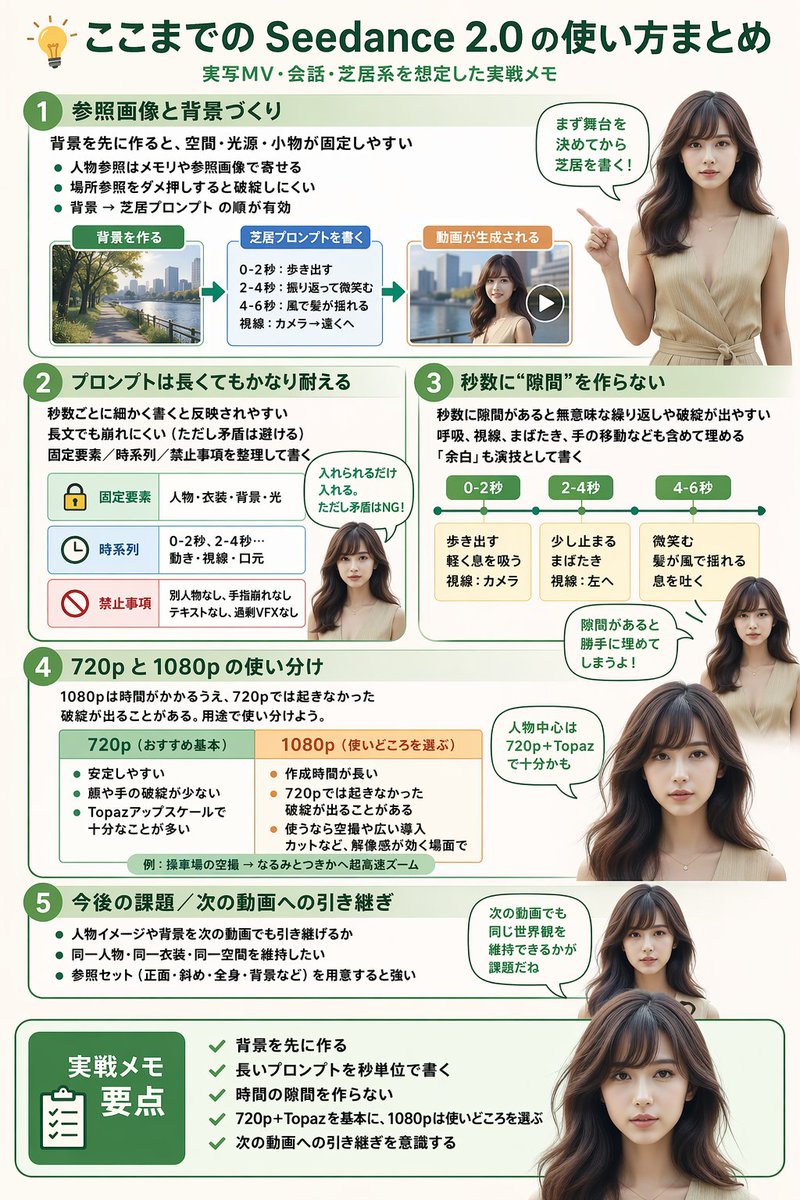
Software Workflow Infographic - Image 1

이미지 프롬프트

Software Workflow Infographic

Generates a highly structured, multi-section infographic featuring a photorealistic human guide, ideal for software tutorials, workflow summaries, or best-practice guides.

모델
GPT Image 2 프롬프트
카테고리
인포그래픽 / 교육 시각자료 / 제품 마케팅
출처
내부 큐레이션
46 회 조회 0 회 복사 0 회 시도 클릭

전체 프롬프트

대상 모델에 바로 붙여넣고 입력 이미지에 맞게 조정하세요.

라이브러리로 돌아가기
{
  "type": "infographic",
  "style": "clean, modern, professional, soft green and beige color palette, photorealistic character integration",
  "header": {
    "icon": "lightbulb",
    "title": "{argument name=\"main title\" default=\"ここまでの Seedance 2.0 の使い方まとめ\"}",
    "subtitle": "{argument name=\"subtitle\" default=\"実写MV・会話・芝居系を想定した実践メモ\"}"
  },
  "presenter_character": "{argument name=\"presenter description\" default=\"photorealistic young Japanese woman with long dark brown hair wearing a beige sleeveless top\"}",
  "total_presenter_cutouts": 6,
  "layout": {
    "sections": [
      {
        "number": 1,
        "title": "{argument name=\"section 1 title\" default=\"参照画像と背景づくり\"}",
        "elements": "3 bullet points, 1 horizontal 3-step flowchart with thumbnail images (cityscape, text box, video player)",
        "presenter_pose": "pointing left towards the flowchart, with a speech bubble"
      },
      {
        "number": 2,
        "title": "{argument name=\"section 2 title\" default=\"プロンプトは長くてもかなり耐える\"}",
        "elements": "2 bullet points, 1 table with 3 rows featuring icons (lock, clock, prohibition sign)",
        "presenter_pose": "neutral expression, looking forward, with a speech bubble"
      },
      {
        "number": 3,
        "title": "秒数に“隙間”を作らない",
        "elements": "2 bullet points, 1 horizontal timeline graphic with 3 segments",
        "presenter_pose": "pointing up, looking slightly left, with a speech bubble"
      },
      {
        "number": 4,
        "title": "720p と 1080p の使い分け",
        "elements": "text description, 1 two-column comparison table (green column, orange column)",
        "presenter_pose": "looking forward, with a speech bubble"
      },
      {
        "number": 5,
        "title": "今後の課題 / 次の動画への引き継ぎ",
        "elements": "4 bullet points",
        "presenter_pose": "looking slightly right, with a speech bubble"
      },
      {
        "type": "summary_box",
        "title": "実践メモ 要点",
        "elements": "clipboard icon, 5 checklist items with green checkmarks",
        "presenter_pose": "large portrait from chest up, looking directly at viewer"
      }
    ]
  }
}

출처 기록

저작권, 작성자, 전파 데이터를 검토할 수 있도록 원본 출처를 보존합니다.

GitHub 출처:YouMind-OpenLab/gpt-image-2-prompts-search

이 페이지는 YouMind OpenLab GitHub 오픈소스 프롬프트 라이브러리를 바탕으로 재정리했습니다. 라이선스: MIT。