wikiHow Article Mockup - Image 1

이미지 프롬프트

wikiHow Article Mockup

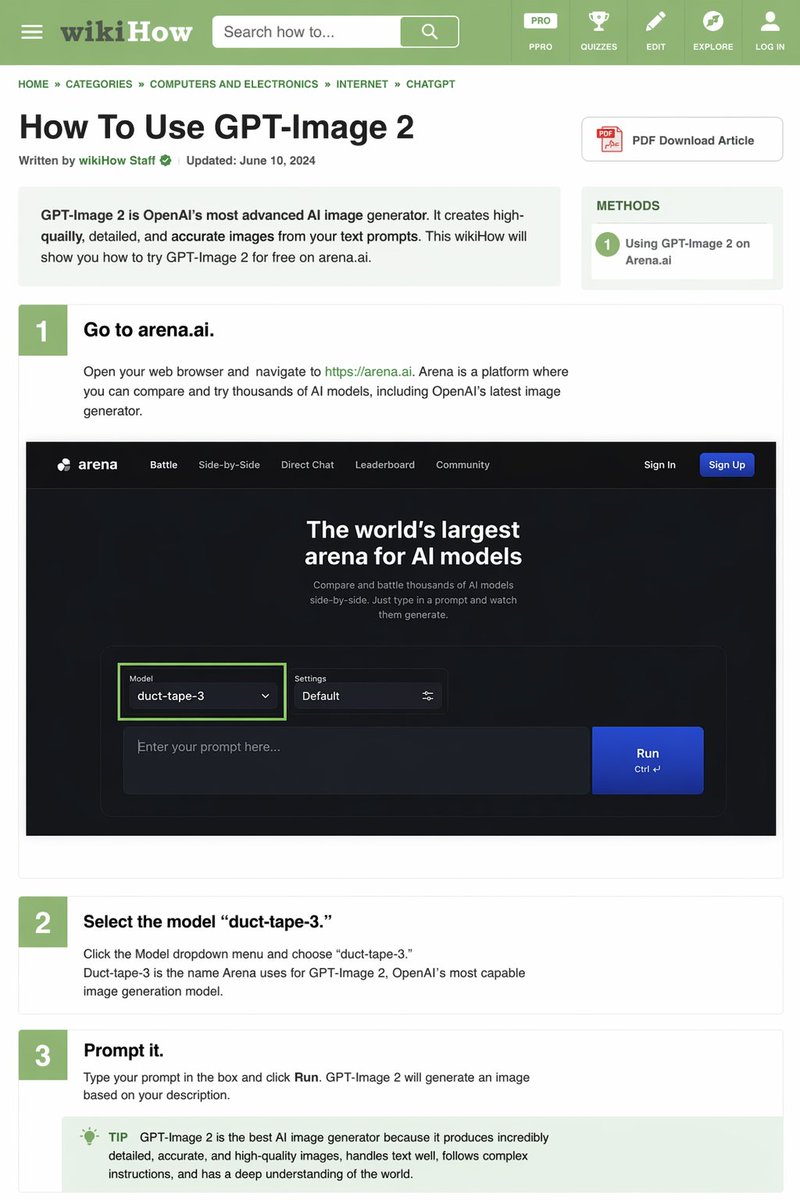
Generates a detailed, text-heavy tutorial webpage mimicking the wikiHow layout, complete with instructional steps and embedded UI mockups.

모델
GPT Image 2 프롬프트
카테고리
앱 / 웹 디자인 / 인포그래픽 / 교육 시각자료
출처
내부 큐레이션
43 회 조회 0 회 복사 0 회 시도 클릭

전체 프롬프트

대상 모델에 바로 붙여넣고 입력 이미지에 맞게 조정하세요.

라이브러리로 돌아가기
{
  "type": "wikiHow article mockup",
  "header": {
    "background": "green",
    "elements": [
      "hamburger menu icon",
      "wikiHow logo",
      "search bar with 'Search how to...' text",
      "5 navigation icons: PRO/PPRO, QUIZZES, EDIT, EXPLORE, LOG IN"
    ]
  },
  "breadcrumbs": "HOME » CATEGORIES » COMPUTERS AND ELECTRONICS » INTERNET » CHATGPT",
  "article_info": {
    "title": "{argument name=\"article title\" default=\"How To Use GPT-Image 2\"}",
    "metadata": "Written by wikiHow Staff | Updated: June 10, 2024",
    "sidebar": [
      "PDF Download Article button",
      "METHODS box: 1 Using GPT-Image 2 on Arena.ai"
    ]
  },
  "intro_box": "GPT-Image 2 is OpenAI's most advanced AI image generator. It creates high-quailly, detailed, and accurate images from your text prompts. This wikiHow will show you how to try GPT-Image 2 for free on arena.ai.",
  "steps": [
    {
      "number": 1,
      "title": "{argument name=\"step 1 title\" default=\"Go to arena.ai.\"}",
      "description": "Open your web browser and navigate to https://arena.ai. Arena is a platform where you can compare and try thousands of AI models, including OpenAI's latest image generator.",
      "embedded_image": {
        "type": "dark mode website UI mockup",
        "logo": "arena",
        "navigation": ["Battle", "Side-by-Side", "Direct Chat", "Leaderboard", "Community", "Sign In", "Sign Up button"],
        "hero_text": "The world's largest arena for AI models",
        "input_ui": {
          "model_dropdown": "Model: {argument name=\"model name\" default=\"duct-tape-3\"}",
          "settings": "Default",
          "text_input": "Enter your prompt here...",
          "button": "Run"
        }
      }
    },
    {
      "number": 2,
      "title": "{argument name=\"step 2 title\" default=\"Select the model 'duct-tape-3.'\"}",
      "description": "Click the Model dropdown menu and choose 'duct-tape-3.' Duct-tape-3 is the name Arena uses for GPT-Image 2, OpenAI's most capable image generation model."
    },
    {
      "number": 3,
      "title": "{argument name=\"step 3 title\" default=\"Prompt it.\"}",
      "description": "Type your prompt in the box and click Run. GPT-Image 2 will generate an image based on your description.",
      "tip_box": "TIP GPT-Image 2 is the best AI image generator because it produces incredibly detailed, accurate, and high-quality images, handles text well, follows complex instructions, and has a deep understanding of the world."
    }
  ]
}

출처 기록

저작권, 작성자, 전파 데이터를 검토할 수 있도록 원본 출처를 보존합니다.

GitHub 출처:YouMind-OpenLab/gpt-image-2-prompts-search

이 페이지는 YouMind OpenLab GitHub 오픈소스 프롬프트 라이브러리를 바탕으로 재정리했습니다. 라이선스: MIT。